AI eBay Listing Tools Comparison: ListEasier vs Spadeberry vs QuickList
An honest comparison of the top three AI-powered eBay listing tools. We compare pricing, speed, quality of listings, ease of use, and overall value to help you choose the right tool for your business.
Posted by
 Isaac Lewis
Introduction
As an eBay seller, you know that creating listings is one of the most time-consuming parts of your business. AI listing tools have emerged as a game-changer, promising to cut listing time from minutes to seconds. But with several options on the market, which one should you choose?
In this comparison, we'll take an objective look at three of the most popular AI listing tools: ListEasier, Spadeberry (formerly BetterLister), and QuickList. Full disclosure: I'm the founder of QuickList, but I'll do my best to present an honest, fair comparison of all three tools.
Pricing Comparison
Pricing structures vary significantly between the tools. Here's the breakdown:
- Spadeberry: $0.50 per listing (flat rate)
- ListEasier: ~$0.07 per listing at 1,000 listings/month
- QuickList: ~$0.07 per listing at 1,000 listings/month
Spadeberry is by far the most expensive at 50 cents per listing. That's over 7x more expensive than the other two tools. For 1,000 listings, you'd pay $500 with Spadeberry versus $70 with ListEasier or QuickList.
ListEasier becomes cheaper than QuickList once you're doing 10,000+ listings per month due to volume discounts. For most sellers doing under 10k listings/month, QuickList and ListEasier are comparable in price, with QuickList offering more plan options and flexibility.
Speed Comparison
Speed matters when you're listing hundreds of items. I tested all three tools with the same item, a polo ralph lauren button up flannel shirt. I ran the tests multiple times to get accurate average listing times. Here's what I found:
- ListEasier: 21 seconds per listing
- QuickList: 47 seconds per listing
- Spadeberry: 2 minutes 35 seconds per listing
ListEasier was the fastest averaging 21 seconds, followed by QuickList at 47 seconds. Spadeberry was significantly slower at a whopping 2 minutes and 35 seconds. I originally thought it was a fluke, but I ran multiple tests and got the same results each time.
Note: It is important to note that these times are for creating individual listings. These tools are primarily designed for bulk listing, where listings generate simultaneously in parallel, meaning the 'time per listing' would technically be much faster. With that being said, we can still get a general idea of the speed of the tools from this test.
Listing Quality Comparison
I tested all three tools with the same item: a men's polo ralph lauren plaid flannel button-up shirt with a leather shoulder patch. This gave me a real comparison of how each tool handles a typical eBay item with multiple features. While all tools advertise quality listings across all categories, I sell a lot of clothing as do many other eBay sellers, so I figured this was a good pick. Feel free to try out the tools with your own items and see how they perform.
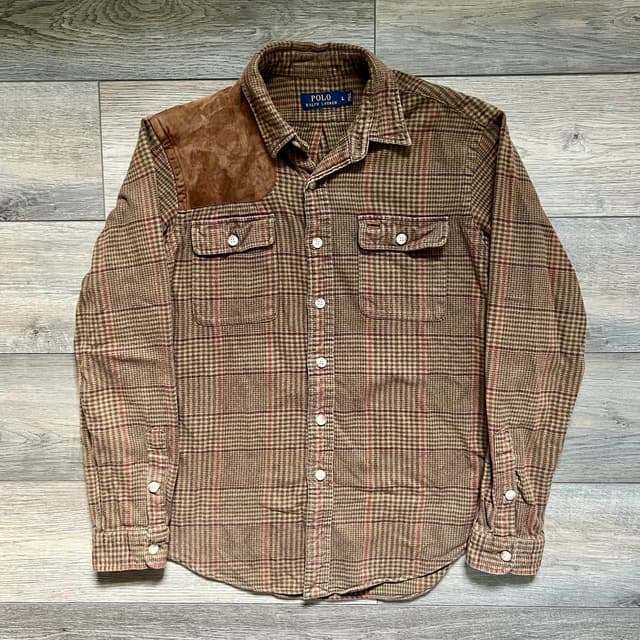
The item I used for testing
Title Quality
ListEasier: "Polo Ralph Lauren Men's Casual Button-Down Shirt Brown L Cotton"
This was the least impressive title of the three. I tested multiple times and got the same generic title each time. It missed key features like the plaid pattern, flannel material, and suede shoulder patch - all important search terms.
Spadeberry: "Polo Ralph Lauren Shirt Mens Large Brown Plaid Suede Shoulder Hunting"
Much better. It captured the plaid pattern and suede shoulder accent. The "Hunting" addition is interesting - it may have detected the shooting/hunting style from the shoulder patch design.
QuickList: "Polo Ralph Lauren Plaid Flannel Button Up Shirt Mens L Suede Shoulder Patch"
Also a solid structured title. It included all of the basic details, and added keywords like plaid and flanel and the distinctive suede shoulder patch, all in an optimized format.
I slightly prefer the QuickList title, but Spadeberry's is comparable. ListEasier's title is clearly inferior and could have included more relevant keywords, which are important for optimizing for eBay search visibility.
Description Quality
ListEasier:
"This Polo Ralph Lauren men's casual button-down shirt features a classic plaid pattern in warm tones. This Polo Ralph shirt includes a distinctive suede shoulder patch on the right side, adding a unique rugged touch to the traditional design. Designed with long sleeves and buttoned cuffs, this shirt provides adjustable coverage and a tailored fit. Two button-flap chest pockets enhance functionality and style, ideal for carrying small essentials or simply adding to the shirt's visual appeal. The structured collar and button closure complete the look, making it versatile for casual outings or layering under jackets during colder seasons."
ListEasier's description is a bit wordy and salesy in my opinion. It's well-written but could be more concise. It does do a good job at covering the key features of the item.
Spadeberry:
"Brand: Polo Ralph Lauren
Style: Long-sleeve button-front casual shirt with brown plaid pattern and faux suede shooting shoulder patch on the left side.
Gender: Mens
Size on tag: Large
Color: Brown, tan, and burgundy plaid check.
Material: 100% cotton exclusive of decoration (per tag) with a soft brushed flannel feel.
Country of manufacture: Made in Sri Lanka.
Tag details: RN 41381.
Details: Point collar, two button-flap chest pockets, front button closure, adjustable button cuffs, curved hem, rugged hunting and outdoors inspired design."
Spadeberry takes a list-based approach, just listing the details in a structured format. It's clear and factual but might not be everyone's cup of tea. One bonus: Spadeberry provided an accurate condition description that the other tools don't include: "Gently worn with light overall wash wear, no obvious stains or holes. Faux suede shoulder panel shows mild creasing. All buttons present and functional."
QuickList:
"Men's Polo Ralph Lauren long sleeve plaid flannel button up shirt in size L with suede shoulder patch and dual chest pockets. Constructed from 100% cotton flannel, it features a classic point collar, button front closure, and a relaxed regular fit suitable for casual wear and cooler seasons."
QuickList's description is brief but comprehensive - just a couple of sentences that describe the shirt effectively. I prefer this concise approach over ListEasier's wordiness or Spadeberry's list format.
Note: This is meant to give you an idea of the description quality of the tools, but all tools have a template option where you can provide your own description if you don't like the generated one. QuickList goes a step further and allows you to prompt the AI for your preferred description format or title structure, in addition to setting your own preset text.
Item Specifics
- Spadeberry: 15 item specifics
- ListEasier: 20 item specifics
- QuickList: 19 item specifics
Honestly, the item specifics were pretty comparable between the tools. They provided all required item specfiics and most of the relevant optional specifics. Everything was also accurate and properly formatted, no big compaints here.
One small difference potentially worth noting: Spadeberry chose "Brown" for color, while QuickList chose "Multicolor" since it was a plaid flannel. Both are valid choices. ListEasier, however, created its own value of "Brown Plaid" which isn't one of eBay's preferred preset values. This is a small detail but using non-standard values can potentially affect search visibility. Another thing worth noting is that while QuickList and Spadeberry fill out condition and price, ListEasier leaves those fields up to you.
Ease of Use Comparison
All three tools require you to link your eBay account and set up business policies (payment, returns, shipping) as well as enter your zip code. These are unavoidable setup steps and are relatively easy to complete across all platforms.
ListEasier
ListEasier focuses exclusively on bulk listing. The workflow forces you to select a category for that bulk batch upfront, which streamlines the process but also locks you in. This is a major limitation: for our clothing example, you would only be able to list all men's casual button-down shirts, or all men's jeans, or all women's leggings. As a clothing seller, while all items fall under the broad clothing category, items they in many different subcategories, which means you'd have to set up different batches for all of them.
The user interface is relatively straightforward and easy to use, though it can feel a bit clunky at times. There are more steps required and things to fill out before you get to listing compared to the other tools. I also noticed a few error pages here and there when navigating the site, but nothing that effected the functionality of the tool.
QuickList
QuickList stands out in that it offers both bulk and individual listing options, giving you flexibility based on your needs. The individual listing option is great for doing just a few listings or listing a one-off item. The other tools require you to use their bulk listing workflow even for single items. The bulk workflow for QuickList includes a middle step where you verify or edit the category for the listings, giving you control before generation. This prevents the category lock-in issue that ListEasier has, allowing you to mix and match items with different categories in the same batch.
QuickList's UI is by far the most intuitive and snappy. It keeps things simple and fairly self-explanatory, and it also worked the best on mobile. The interface is designed for speed and ease of use, while still including all of the features.
Spadeberry
Spadeberry also focuses exclusively on bulk listing. In the bulk workflow, it automatically chooses the category for you. If it's wrong, you'll have to change it and manually change all the details of the listing, or re-generate the listing. Both of which are not ideal and more time-consuming.
Spadeberry has a bit more of a learning curve than the other tools, with the UI being a little more convoluted and some things not being so easy to figure out. The interface was a little confusing at first, but I got the hang of it relatively quickly.
Overall, QuickList provides the best ease of use experience. The combination of an intuitive interface, flexible individual and bulk listing options, and excellent mobile support makes it the most user-friendly tool. ListEasier's category lock-in limitation and Spadeberry's automatic category selection (which can be wrong) both create friction in the listing process. QuickList's approach strikes the right balance between automation and user control, resulting in a smoother, more efficient workflow.
Final Verdict
Spadeberry
While Spadeberry does create quality listings, the price is far higher than the other two tools, and the listings are not that much better to justify the extra cost. It doesn't help that it's also significantly slower than the other two. Unless there is something they offer that you can't go without, the value proposition is just hard to justify.
ListEasier
ListEasier is very fast and consistent, but it lacks in several areas. The biggest issue is that it locks you into specific categories per bulk batch, which is problematic for sellers with diverse inventory. There are also more preliminary steps to go through and the UI is a bit clunky. It's probably best if you're doing very high volume of the same repetitive items in single categories such as thousands of postcards or something similar.
QuickList
In my opinion, QuickList is the best all-around tool. In my tests, it created a better, more optimized listing than ListEasier in a slightly longer but still fast time. It doesn't lock you into single categories per batch and doesn't force-select potentially incorrect categories. The customization options of the templates with custom AI prompting also make QuickList stand out from the other tools. Lastly, QuickList's UI is by far the most intuitive and snappy, and it works great on both desktop and mobile. The individual listing option in addition to bulk is great to have and also sets it apart from the competition.
My Recommendation
For most eBay sellers, QuickList offers the best combination of speed, quality, pricing, and ease of use. It's particularly well-suited for sellers with diverse inventory who need flexibility in their listing workflow. ListEasier is a solid choice if you're doing very high volume of similar items in the same category, and are okay with less detailed listings. While Spadeberry does hold up well in quality, the slower speed and significant price premium make it tough to recommend.
The best way to decide? Try each tool with a few of your items and see which one works best for you and workflow. ListEaiser and QuickList both offer 10 listings for free and Spadeberry offers a free trial, so you can test the quality before committing.
